-300x91.png "QuickLink BD")
Networking
Best Quality Networking Accessories in Bangladesh
What Are the Different Types of Networking Devices?
- Router: A device that connects two or more IP networks. Essentially, a router serves two purposes: 1) It manages transmissions between networks by forwarding data packets to their appropriate IP addresses 2) It allows multiple devices to share a single internet connection.
- Modem: A modem is a hardware device that allows computers, routers, or switches to connect to the internet.
- Switch: A multiport device used to connect several computers via the Ethernet port.
- Hotspots: Are Physical locations where people use Wi-Fi to access the internet via a wireless local area network with a router that is connected to an internet service provider.
- Ethernet Hubs: An ethernet hub connects several computers together. It also acts as a repeater and amplifies signals.
- Gateway: A gateway in the computer networking acts as a ‘gate’ or entry and exit point between networks.
- Repeater: Repeaters are essentially range extenders as they forward wireless signals from a WiFi router in order to cover a larger area.
- Bridges: To connect multiple LAN network, one needs a bridge; it acts as a network aggregator, connecting multiple LAN networks to create one large LAN network.
How function networking devices?
- Facilitate data transmission and communication between devices.
- Enable efficient and secure network connectivity.
- Enhance network performance and optimize traffic flow.
- Provide network security by enforcing access control and threat prevention.
- Simplify network management and configuration.
How do network devices work together?
Devices often use Ethernet cables to connect to a switch's ports. When transferring frames, the switch refers to an address table that has stored the MAC addresses of such devices in. Switches transfer data straight to the designated destination port, whereas routers forward data to an IP address or network.
What is the basic device of a network?
The physical components that enable hardware on a computer network to connect and communicate with one another are referred to as network devices, sometimes called networking gear. Repeater, Hub, Bridge, Switch, Routers, Gateway, Brouter, NIC, etc. are a few examples.
How do network devices communicate?
Computer networks use cables, fiber optics, or wireless communications to link nodes, such as computers, switches, and routers. Devices within a network can communicate and exchange data and resources thanks to these links. Protocols, which specify how communications are made and received, are followed by networks.
Best Networking Accessories Shop In Bangladesh From QuickLink BD
QuickLink BD stands as Bangladesh's largest retail destination for Gadgets, Office Equipments, monitors, Router, Networking Accessories, Extender, Networking Accessories, Networking Products, and UPS. Visit any of our branches for unbeatable deals on your preferred Micropack Mouse. Additionally, our extensive range of products and services is available on the QuickLink BD e-online store. Choose from a variety of payment methods and enjoy hassle-free EMI options. Our delivery network spans across Bangladesh, ensuring nationwide coverage. Shop with us for convenience, reliability, and exceptional value.

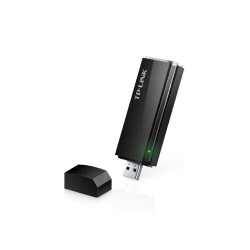
- Interface: USB 3.0
- Frequency: 5GHz 2.4GHz
- Antenna: 2 High Gain External Antennas
- Compatible with: Windows 10/8.1/8/7/XP, Mac OS X 10.9-10.13

- PoE default: 1, 2(+)/3, 6(-).
- 60W build-in power adapter.
- Build-in power adaptor AC100~240V 50-60Hz,65W

- Frequency: 2.4GHz & 5GHz
- Speeds: up to 750Mbps
- Power Consumption: About 6.5W
- Transmit Power: < 20 dBm

- Frequency: 2.4~2.4835GHz
- 2 fixed external antennas
- Power Consumption: About 3W
- 300Mbps Wi-Fi Range


- Wi-Fi Coverage (approximate): Up to 1500 sq. ft.
- Data Transfer Rate 1200 Mbps
- Wi-Fi 5 Generation
- Up to 20 User connections

- PoE default: 1, 2(+)/3, 6(-).
- Switching Capacity: 2.0Gbps
- IP30 Protection Level
- 96W build-in power adapter
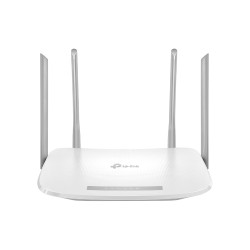
- 4 External Antennas
- Easy Mesh Compatible
- Up to 1000 Mbps Internet Access
- Remote Management

- Model: Tp-link TL-WA855RE
- Antenna 2 x external
- Frequency 2.4~2.4835GHz
- Interface 1 x 10/100M Ethernet Port

- Wi-Fi Coverage (approximate): Up to 2500 sq. ft.
- Data Transfer Rate 1200 Mbps
- Wi-Fi 5 Generation
- Up to 20 User connections

- Deliver Wi-Fi to an area of up to 1500 square feet
- connect up to 100 devices
- Frequency: 2.4 GHz, 5 GHz
- Speed up to 1167 Mbps

- Frequency: 2.4-2.4835GHz
- Power: PoE or external 9VDC
- Interface: Fast Ethernet (RJ-45) Port *1
- Compatible with: Microsoft Windows 10/8/7/Vista/XP

- AI Extend 300meters transmission
- PoE Watchdog function
- Support port priority by default
- Auto Speed Change

- Wireless Standards: IEEE 802.11ac/n/a 5GHz, IEEE 802.11b/g/n 2.4GHz
- Signal Rate: 867Mbps at 5GHz, 300Mbps at 2.4GHz
- Mesh Technology: WPA EasyMesh, TP-Link OneMesh
- Protocols: Supports IPv4 and IPv6

- Wi-Fi Coverage (approximate): Up to 2000 sq. ft.
- Frequency: 2.4GHz and 5GHz
- Data Transfer Rate 1200 Mbps
- Up to 64 (Max.) & Standard: 15 Devices

- Deliver Wi-Fi to an area of up to 2,000 square feet
- connect up to 100 devices
- Frequency: 2.4 GHz, 5 GHz
- Speed up to 1200 Mbps

- Frequency: 2.4GHz
- Network Standard: IEEE 802.11n/g/b
- Antenna: Internal 2*1.8dBi Omni
- Compatible: Windows XP, Windows 7, 8,10

- Wi-Fi Coverage (approximate): Up to 2500 Sq.Ft.
- Data Transfer Rate 1900 Mbps
- Wi-Fi 5 Generation
- Up to 25 User connections

- Data Rates: 150 Mbps, UL: 50 Mbps
- Wireless Standards: IEEE 802.11b/g/n
- Frequency: 2.4 GHz
- Transmit Power: <20dBm

- 3×3 MIMO Technology
- Personalized Management
- 802.11ac Wave2 Wi-Fi
- Intelligent Connection