-300x91.png "QuickLink BD")
Networking
Best Quality Networking Accessories in Bangladesh
What Are the Different Types of Networking Devices?
- Router: A device that connects two or more IP networks. Essentially, a router serves two purposes: 1) It manages transmissions between networks by forwarding data packets to their appropriate IP addresses 2) It allows multiple devices to share a single internet connection.
- Modem: A modem is a hardware device that allows computers, routers, or switches to connect to the internet.
- Switch: A multiport device used to connect several computers via the Ethernet port.
- Hotspots: Are Physical locations where people use Wi-Fi to access the internet via a wireless local area network with a router that is connected to an internet service provider.
- Ethernet Hubs: An ethernet hub connects several computers together. It also acts as a repeater and amplifies signals.
- Gateway: A gateway in the computer networking acts as a ‘gate’ or entry and exit point between networks.
- Repeater: Repeaters are essentially range extenders as they forward wireless signals from a WiFi router in order to cover a larger area.
- Bridges: To connect multiple LAN network, one needs a bridge; it acts as a network aggregator, connecting multiple LAN networks to create one large LAN network.
How function networking devices?
- Facilitate data transmission and communication between devices.
- Enable efficient and secure network connectivity.
- Enhance network performance and optimize traffic flow.
- Provide network security by enforcing access control and threat prevention.
- Simplify network management and configuration.
How do network devices work together?
Devices often use Ethernet cables to connect to a switch's ports. When transferring frames, the switch refers to an address table that has stored the MAC addresses of such devices in. Switches transfer data straight to the designated destination port, whereas routers forward data to an IP address or network.
What is the basic device of a network?
The physical components that enable hardware on a computer network to connect and communicate with one another are referred to as network devices, sometimes called networking gear. Repeater, Hub, Bridge, Switch, Routers, Gateway, Brouter, NIC, etc. are a few examples.
How do network devices communicate?
Computer networks use cables, fiber optics, or wireless communications to link nodes, such as computers, switches, and routers. Devices within a network can communicate and exchange data and resources thanks to these links. Protocols, which specify how communications are made and received, are followed by networks.
Best Networking Accessories Shop In Bangladesh From QuickLink BD
QuickLink BD stands as Bangladesh's largest retail destination for Gadgets, Office Equipments, monitors, Router, Networking Accessories, Extender, Networking Accessories, Networking Products, and UPS. Visit any of our branches for unbeatable deals on your preferred Micropack Mouse. Additionally, our extensive range of products and services is available on the QuickLink BD e-online store. Choose from a variety of payment methods and enjoy hassle-free EMI options. Our delivery network spans across Bangladesh, ensuring nationwide coverage. Shop with us for convenience, reliability, and exceptional value.

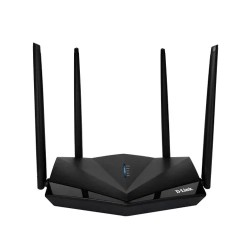
- WPA/WPA2 & Firewall(NAT) Security
- Wireless Interface
- 4 X 5dBi External Antenna
- Dimension: 255.9 x 168 x 41.2 mm
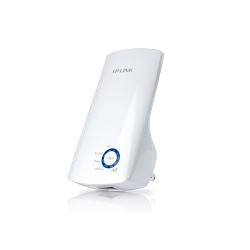
- Model: TP-Link TL-WA850RE
- Interface: 1 * 10/100M LAN Port
- Frequency: 2.4~2.4835GHz
- Power: < 20 dBm

- Frequency 2.400 - 2.4835GHz
- Interfaces USB 2.0
- Frequency 2.400 - 2.4835GHz
- Supports Windows 11/10/8.1/8/7/XP

- 10/100Mbps auto-sensing RJ45 ports
- Plug-and-Play Design
- Energy Efficient Performance
- Compact and Versatile
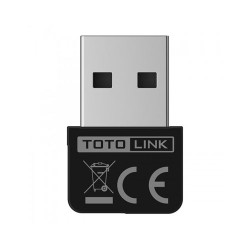
- Data Rate: Up to 150Mbps
- LED: 1 *Wireless
- Frequency: 2.4GHz
- Compatible with: Windows 10, 8, 7, XP

- 300Mbps Fast Wi-Fi connections
- Frequency 2.400 - 2.4835GHz
- Supports Windows 11/10/8.1/8/7/XP
- Interfaces USB 2.0
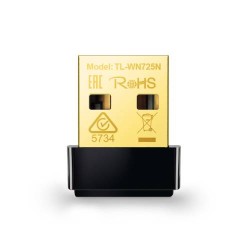
- Model: TP-LINK TL-WN725N
- Frequency: 2.4GHz
- Interface: USB 2.0
- Dimensions: 0.73 × 0.59 × 0.28 in

- 8-Port 10/100M Network Switch
- Compact and Versatile Design
- Energy-Efficient Performance
- Reliable Data Transmission

- Type Bluetooth 4.0
- Driver Free
- Nano-Sized
- Supported Operating System

- Antenna: 2 *Internal striped antennas
- Data Rates: Up to 300Mbps
- Frequency: 2.4~2.4835GHz
- Compatible with: Windows 10,8,7, XP, Linux
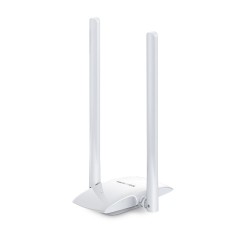
- 300Mbps Wi-Fi connection
- Two 5dBi high gain Antennas
- Micro USB 2.0
- Supports Windows 11/10/8.1/8/7/XP

- Expand the Connectivity
- Compact and Portable Design
- Fast and Stable Data Connection
- Plug & Play with increased compatibility
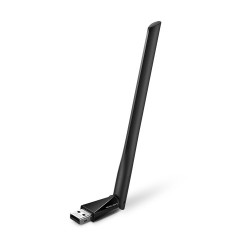
- High-Speed Dual-Band Wi-Fi
- 5dBi high-gain Antenna
- WiFi Speeds Up to 433Mbps
- Support Systems :Windows 11/10/8.1/8/7/XP

- 10/100/1000M Ethernet security switch
- High Performance
- Energy Efficient
- Safety and Compliance

- Interface: PCI Express
- Antenna Gain: 2dBi
- Frequency: 2.400-2.4835GHz
- Storage Temperature: -40℃~70℃
%20(1)-250x250.jpg "TENDA HG1 SINGLE PORT GPON OPTICAL ONU")
- Compliant with ITU-T G.984 standard
- Upstream Rate: up to 1.25Gbps
- Downstream Rate: up to 2.5Gbps
- Transmission distance: 20km Max
-250x250.jpeg "XGTEC EU201-G EPON ONU")
- Extreme Temperature and Humidity Tolerance
- User-Friendly Reset and Power Buttons
- High-Speed 1Gbps Ethernet Port
- Compact, Energy-Efficient Design
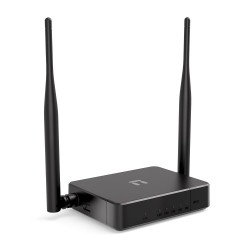
- Data Transfer Rate:Up to 300Mbps
- MIMO high gain 5dBi x 2 antennas
- Internet Access Control
- Multiple Wireless Modes

- Data Rate: 20/200/2000Mbps for Full-Duplex mode
- Interface: 32-bit PCI Express
- Storage Temperature: -40℃~70℃ (-40℉~158℉)
- Compatible with: Windows 7, Vista, XP
-250x250.jpeg "XGTEC GU201-G XPON ONU")
- Power Supply : DC 12V 0.5A
- Reset, Power Button
- Up to 900Mbps
- Upstream Rate : 1.25Gbps